On this page
- Three things people call an AI sandbox environment
- Why employees should not practise on real company data
- The four properties of a safe practice environment
- How to check an environment before you roll it out
- What a training sandbox looks like in practice
- What to ask IT and legal before a pilot
- What a safe sandbox is still missing
- FAQ
- Sources
An AI sandbox environment is a closed space where AI can run without touching anything that matters. The trouble is that three very different groups use the phrase: regulators, developers and trainers. If you are an HR or L&D lead who wants staff to practise with AI safely, only one of them is your subject, and it has four properties you can check before the first session.
This article sorts the three meanings, describes the environment an AI training sandbox provides, explains why practice on real company data is a bad idea, and gives you a checklist you can hand to IT.
Three things people call an AI sandbox environment
Search for the phrase and the results mix three unrelated ideas. Knowing which one a vendor means saves a lot of confusion in a procurement call.
Three things called an AI sandbox
Regulatory sandbox
- For companies building AI products
- Protects the public during supervised testing
- Example: EU AI Act sandboxes
Developer sandbox
- For engineers running agent-written code
- Protects machine and network
- Example: a microVM for an agent
Training sandbox
- For employees learning to work with AI
- Protects company data during mistakes
- Example: workspace with made-up data
Sources: Article 57 of Regulation (EU) 2024/1689; Docker Sandboxes documentation
The regulatory sense. Article 57 of the EU AI Act (Regulation (EU) 2024/1689) sets out AI regulatory sandboxes. It describes them as "a controlled environment that fosters innovation and facilitates the development, training, testing and validation of innovative AI systems for a limited time" (Article 57 on the European Commission's AI Act Service Desk; the full regulation is on EUR-Lex). It is about bringing a product to market. It has nothing to do with staff practice. The rule that does concern staff is Article 4: what Article 4 asks of employers.
The developer sense. When an AI agent writes and runs code, engineers put it in an isolated virtual machine. Docker's documentation puts it plainly: "The primary trust boundary is the microVM", and credentials are added by a proxy on the host so that "the raw credential values never enter the VM" (Docker Sandboxes, security model). The same isolation logic applies to a training environment, whoever the learner is.
The training sense is yours: a place where an employee can try an agent, make a mess and learn, with nothing real at stake.
Why employees should not practise on real company data
The quickest way to let people try AI is to give them the company's tools and say "go ahead". It is also the riskiest, for two reasons.
- Data. A first prompt is often a pasted customer email, a contract or a salary table. Someone learning has no instinct yet for what should not be pasted.
- Actions. An agent connected to a real mailbox or file share can do real things. A badly worded request is no longer a bad answer, it is a changed file.
Practice also needs freedom to fail. People who fear breaking something stay on the safe, shallow uses, and that is the opposite of what a rollout is for.
The four properties of a safe practice environment
Whatever product or setup you consider, it should have these four. They are the checklist behind any serious AI test environment for employees.
Four properties of a safe practice environment
- IsolationOne sandbox per learner
- Made-up dataNothing real to paste or leak
- Read-only toolsMail and files simulated, never changed
- Nothing installedA browser; no personal AI account
- Isolation per learner. Each person works in an environment of their own. One learner's files, conversation and mistakes never reach another's.
- Made-up data. The files and records are invented for the exercise. Nothing real needs to be pasted, so nothing real can leak.
- Read-only access to company tools. If the exercise connects the agent to mail, calendar or documents, those are simulated and the agent can read but not change them.
- Nothing installed. No software on the employee's laptop, no personal AI account, no API key to share. The less IT has to set up per person, the faster you can start.
How to check an environment before you roll it out
Do not take the brochure's word. Ask for each property to be shown.
| Property | What to ask or try |
|---|---|
| Isolation | Open two accounts at once. Can one see the other's files or conversation? |
| Made-up data | Open the session's files. Is anything in them real, or taken from your company? Who wrote them? |
| Read-only tools | Ask the agent to delete or send something through a connected tool. What happens? |
| Nothing installed | Start from a clean laptop, in a browser. How many steps before the first request? |
What a training sandbox looks like in practice
Here is how one product meets the four properties. Tokenacademy's AI training sandbox gives each employee a sandbox of their own, opened from the browser:
- Isolation. Every learner gets a sandbox of their own, ready with the session's files and data.
- Made-up data. When a session connects the agent to company tools, such as simulated Microsoft 365 mail, calendar and SharePoint, they run on a made-up company.
- Read-only tools. Those simulated tools are read only, and the learner decides what the agent may read, which is a skill in itself.
- Nothing installed. A click opens the session: nothing to install, no AI account to create, no API key. The agent is a real one (Claude Code, Codex or GitHub Copilot, as the organization chooses).
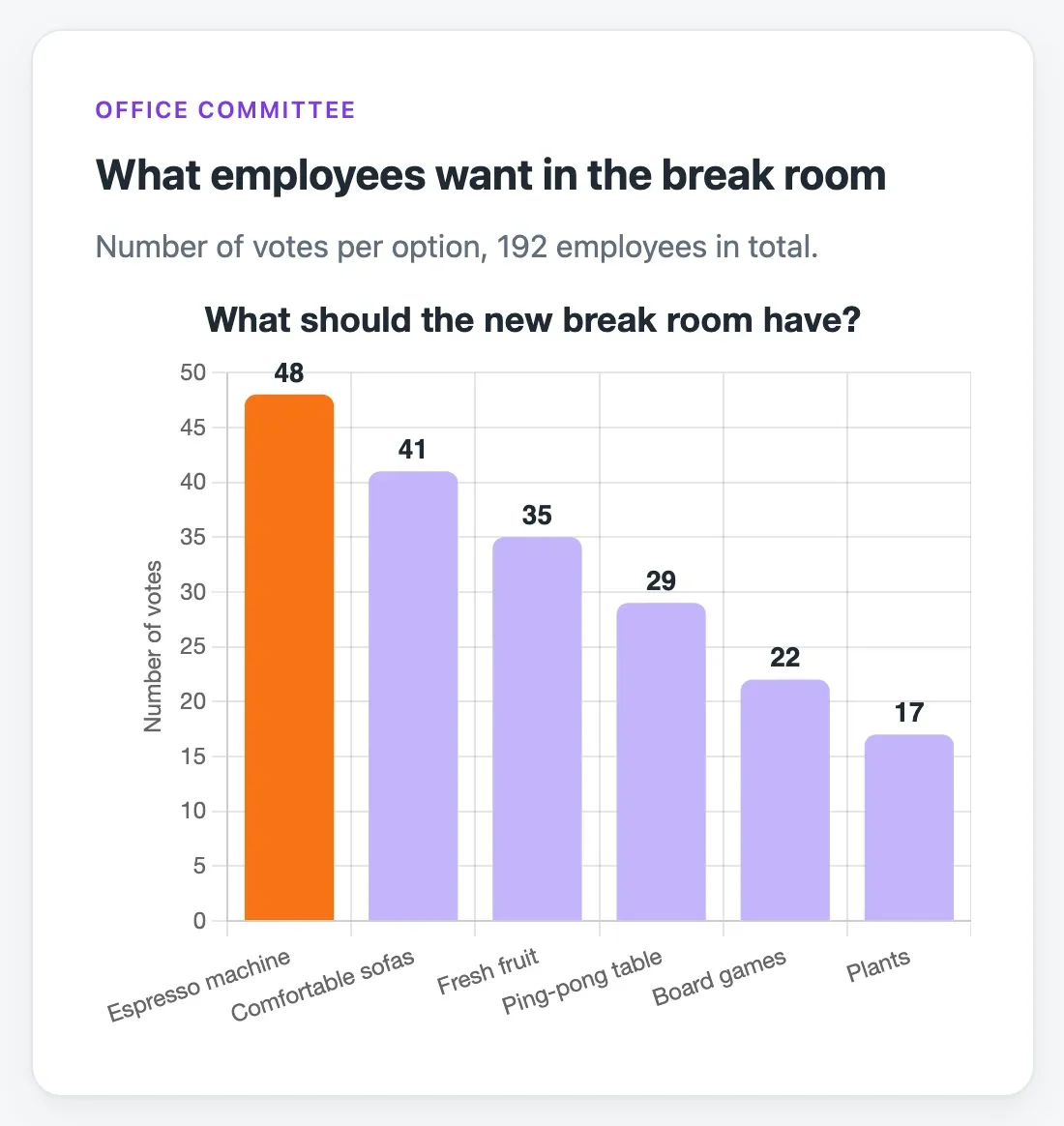 A finished page built in a session, on a made-up survey: the learner sees the result of each request
Tokenacademy's privacy page sets out what the service holds.
What to ask IT and legal before a pilot
A safe environment is also one that IT and legal can approve quickly. Bring them four questions before the first session, so that the pilot does not stall in review:
Four questions for IT and legal
- Who can sign in?Company sign-in, and who sees results
- What data is kept?What the service holds about learners
- What can it reach?Nothing outside the session
- What do legal pages promise?Privacy, terms, cookies: read in full
- Who can sign in? Ask whether learners use the company's own sign-in (single sign-on) or a separate password, and who can see a learner's results. People should only ever see their own organization's colleagues.
- What data does the service hold? Ask the vendor for the list.
- What is the session allowed to reach? For a training sandbox the right answer is nothing outside the session: no company mailbox, no shared drive, no production system. If the exercise uses a connected tool, it should be a simulation on made-up data.
- What do the legal pages promise? Read the vendor's privacy page, terms and cookie notice yourself, and ask your data protection officer to read them too.
Give the same four questions to every vendor on your list. The answers that come back vague tell you as much as the ones that come back precise, and the comparison is much easier to defend afterwards. For the pilot itself, see how to run an AI pilot in eight weeks.
What a safe sandbox is still missing
A safe environment answers one question: can people practise without risk? Tokenacademy's sessions add what an empty prompt box lacks: a brief and milestones to reach, validated automatically on the result, and a coach that gives hints and feedback and never does the work for the learner. Hands-on AI training explains how such sessions run, exercise by exercise.
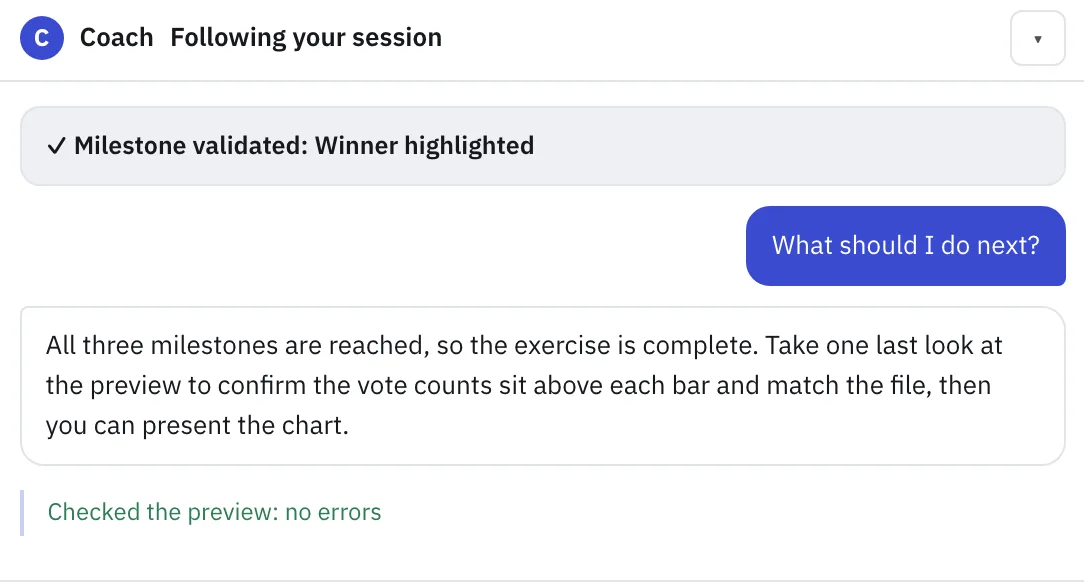 The coach confirms a reached milestone and answers in a few lines, without doing the work
FAQ
What is an AI sandbox environment?
It is an isolated space where AI can be run or tested without touching real systems or data. The phrase covers regulatory sandboxes (supervised testing of AI products), developer sandboxes (isolated machines for agents that run code) and training sandboxes (practice workspaces for employees).
What is the difference between an AI test environment and a production environment?
A test environment uses made-up or copied data and has no consequences if something goes wrong. Production holds real data and real users. For training, you want the first: people can break things and learn, and nothing real is affected.
What types of AI sandbox are there?
Three are common: the regulatory sandbox under the EU AI Act, the developer or agent sandbox that isolates code an AI wrote, and the training sandbox that lets employees practise. They protect different things and are bought by different people.
Is a sandbox environment for AI training safe for company data?
It is as safe as its design: see the four properties above. A setup that asks employees to paste real documents is not a sandbox.
Can employees practise with AI without an IT project?
It depends on the setup. If the environment runs in the browser with no installation and no per-person AI account, IT's part is mostly reviewing the vendor, not deploying software.
Sources
- European Commission, AI Act Service Desk, Article 57 (AI regulatory sandboxes): https://ai-act-service-desk.ec.europa.eu/en/ai-act/article-57
- Regulation (EU) 2024/1689, the AI Act: https://eur-lex.europa.eu/eli/reg/2024/1689/oj/eng
- Docker Sandboxes, security model: https://docs.docker.com/ai/sandboxes/security/