On this page
What are AI agents? An AI agent is an AI model that is given a goal and the means to act on it. It reads, uses tools, looks at what happened and decides what to do next, until the work is done or it needs you. A chatbot answers; an agent works.
That difference matters for any company training its staff. Using a chatbot is a skill of writing good questions. Working with an agent also means giving it a clear goal, deciding what it may touch and checking what it did. This guide explains the idea without code, then says where agents go wrong. For concrete cases, see agentic AI examples from named companies; to go further, build AI agents without code. Facts were checked on 3 November 2026.
The loop an AI agent repeats until done
- Gather contextRead files, search, look things up
- Take actionUse a tool: edit, run, send, fetch
- Verify the resultCheck what the action returned
- Check if doneThe person can interrupt at any point
Not done: go again
Phases as described in Claude Code's documentation (code.claude.com).
What are AI agents? Chatbot or agent, the difference
A chatbot turns one message into one reply. You read the reply, decide what is wrong with it and write again. You are the one who runs the steps.
An AI agent is given the outcome instead and runs the steps itself. Anthropic, in its guide to building agents, puts the line between two kinds of system: in a workflow, models and tools are "orchestrated through predefined code paths"; in an agent, the model "dynamically" directs "its own processes and tool usage" (Anthropic, Building effective agents). OpenAI describes the same idea more briefly: agents "plan and complete tasks using tools" and "maintain context across steps" (OpenAI, agents guide).
Chatbot, workflow or agent
Chatbot
- A reply in text
- You run each step
- No tools
- You read and judge
Workflow
- A fixed process's output
- A script, in set order
- Tools, as scripted
- Checks only if scripted
AI agent
- A finished piece of work
- The model runs the steps
- Picks and uses tools
- Reads each result
Workflow and agent as Anthropic defines them in Building effective agents.
In practice the boundary is blurry. Many chat products now include agent features, such as searching the web or running a file. The useful test is not the product's name but who decides the next step: you, a script written in advance, or the model.
How an AI agent works: the loop and the tools
Every agent runs the same cycle. Claude Code's documentation names three phases that "blend together": gather context, take action and verify results, repeated until the task is complete (Claude Code docs, how it works). Anthropic's phrasing is that agents are "typically just LLMs using tools based on environmental feedback in a loop".
Take a plain request: "fix the failing tests". The same documentation shows the agent running the tests to see what fails, reading the errors, searching for the right files, editing them and running the tests again. Each step returns information that decides the next one.
What a tool is
A tool is anything the agent can do besides writing text. Without tools, in the words of the Claude Code docs, "Claude can only respond with text"; with them it can read files, edit them, run commands, search the web and use outside services. The docs sort the built-in tools into five groups: file operations, search, execution, web and code intelligence.
For a business team, a tool is the difference between "here is a draft email" and "the email is in your drafts folder, and I checked the figures against the spreadsheet". The tools an agent has set the limit of what it can do. An agent with only a calendar cannot touch your files.
What shapes an agent's behaviour
Three things decide what an agent does with a task (for two real agents side by side, see Codex vs Claude Code):
- The model, which reasons about the next step.
- The instructions: the role, rules and context you give it, in plain words.
- The tools and permissions: what it can reach, and what it must ask about first.
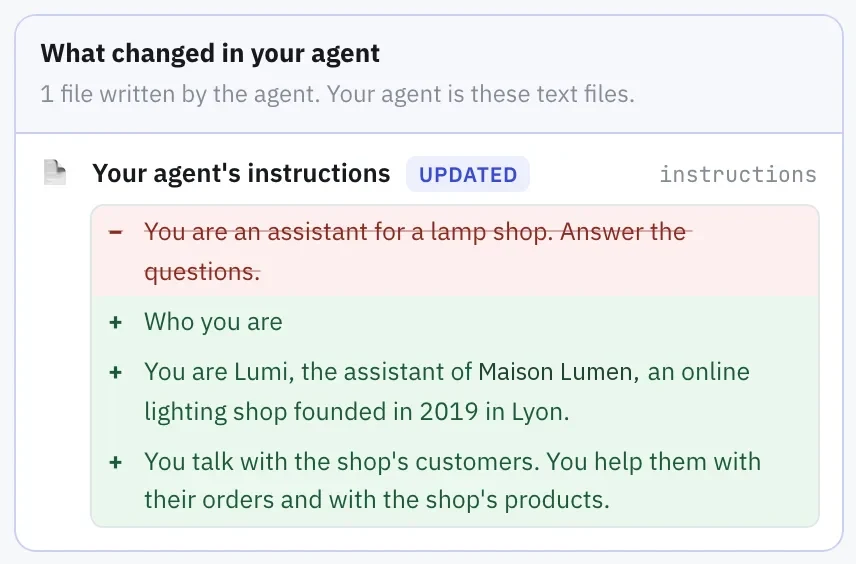 The instructions are plain sentences: the old line is struck out and the new role is added below it.
The person is part of the loop too. In Claude Code you can interrupt at any point, and a permission mode sets what the agent may do without asking: ask before every edit, accept edits, or plan only.
Limits and risks of AI agents
An agent's freedom is also its weak point. Anthropic is direct about it: agentic systems "often trade latency and cost for better task performance", and their autonomy "means higher costs, and the potential for compounding errors". A small misreading at step two can carry through ten more steps. Its guide recommends "extensive testing in sandboxed environments, along with the appropriate guardrails".
In practice, four limits come up:
- Vague goals produce vague work. The agent fills the gaps with guesses. The remedy is a request that states the context, the task, the guidelines and the constraints: the four parts of a request. You can practise writing one with the free Prompt Golf game, which runs in your browser. For a longer drill, work through twelve exercises on context, task, guidelines and constraints.
- Cost grows with steps. Each step reads and writes tokens, and a long job takes many steps. A vague first request that needs rework costs more than a precise one. The free token counter shows how text turns into tokens; what a token is explains why it matters.
- Some actions cannot be undone. Claude Code snapshots files before it edits them, so file changes can be rewound, but its documentation says that actions on remote systems such as databases, APIs or deployments "can't be checkpointed". Give an agent write access only where a mistake is cheap, and let it practise in an isolated sandbox.
- Output still needs a human check. An agent that verifies its work can still verify the wrong thing. Someone who knows the task must read the result.
Four limits of AI agents, and a safeguard each
Vague goals
- Agent fills gaps with guesses
- Safeguard: context, task, guidelines, constraints
Cost grows with steps
- Each step reads and writes tokens
- Safeguard: ask precisely, work done once
Irreversible actions
- Remote systems can't be checkpointed
- Safeguard: write only where mistakes are cheap
Output unchecked
- It can verify the wrong thing
- Safeguard: a person who knows the task reads it
Source: Anthropic; Claude Code documentation
The point is not to avoid agents. It is to decide, per task, how much you let the agent do without asking, and to keep a person responsible for the result.
What this means for training employees
Knowing the definition does not make anyone good at working with an agent. People learn it by doing: stating a goal, watching the agent work, spotting where it went wrong and asking again. That is the idea behind Tokenacademy: hands-on AI training in which each employee practises with a real AI agent, Claude Code, Codex or GitHub Copilot as the organization chooses, on a real project, in the browser, with nothing to install.
For a step-by-step rollout, see the 90-day plan to train employees on AI. If you are weighing what your teams should learn first, book a demo and see a session.
FAQ
What is an AI agent in simple terms?
A program built on an AI model that is given a goal, uses tools to act on it, checks the results and repeats until the job is done or it needs a person.
What is the difference between an AI agent and a chatbot?
A chatbot produces one reply per message and you run the process. An agent runs the steps itself, choosing tools and reading their results, so you hand it an outcome rather than a question.
Do AI agents work without human supervision?
They can run many steps alone, but they should not run unwatched on high-stakes work. Permission settings, sandboxes and a human check of the result are the usual safeguards.
Are AI agents the same as automation?
Not quite. A workflow follows steps written in advance. An agent decides its steps as it goes, which makes it more flexible and less predictable.
Do employees need to code to use AI agents?
No. You describe the goal in plain words, and the agent does the technical work. What matters is the quality of the request and the ability to check the result.
Sources
- Anthropic, Building effective agents: workflows against agents, the loop, costs and compounding errors, sandboxes and guardrails.
- Claude Code documentation, How Claude Code works: the three phases, tools, permissions and checkpoints.
- OpenAI, Agents guide: agents plan and complete tasks using tools.