On this page
To train employees on AI, start from the tasks people already do, give everyone one short foundation, then let each role practise on its own work with a real agent, and measure what people can do rather than who finished a course. This article lays that out as a 90-day plan an L&D team can run, with what to measure and how to budget for it.
Training employees on AI: the 90 days
- Days 1-14Audit and rulesList tasks, one-page policy, pilot teams
- Days 15-30One foundation for allTokens, context, checking answers: short sessions
- Days 31-60Practice on real tasksEach role builds from its own work
- Days 61-90Measure, then scaleCompare milestones, use, time; open more teams
The page on AI training for employees describes what to teach each role; this guide is the plan around it. For the formats themselves, see AI training formats compared; for where adoption stands today, AI adoption statistics.
Start with the tasks, not the tool
Most programmes open with the tool: "here is how the chatbot works". Employees nod, then go back to work with no idea which of their tasks to hand over. Start from the other end.
- List the recurring tasks of each team. Ten minutes with each manager: the claims team's replies to customers, HR's job ads, finance's month-end commentary, the assistants' meeting notes.
- Mark the ones that are text, repetitive and checkable. Those are the first candidates. Tasks with personal data, legal weight or no way to check the result come later, with rules.
- Write a one-page policy before the first session: which tools are allowed, which data stays out, who to ask. People who lack an approved route use their own. In BCG's 2025 survey of more than 10,600 leaders, managers and frontline white-collar employees in 11 countries and regions, more than half said they would find alternatives and use them anyway when the company's tools fell short.
- Take a baseline. Ask each pilot team how long a named task takes today and how often people use AI on it. You cannot show progress without it.
The output is a short table: team, task, risk, owner. It decides what the practice sessions are built from.
Who needs what: four groups
A single course for everyone can bore the people who already use AI daily and lose the ones who have never opened it. Four groups cover most companies.
Four groups, four trainings
Everyone
- What an agent reads, counts, costs
- Checking an answer before use
- What data stays out
Daily users
- Writing a four-part request
- AI on their recurring tasks
- Fixing a wrong answer, not restarting
Builders and champions
- Building a page, chart or agent
- Writing the agent's rules
- Coaching a team
Managers and sponsors
- Which tasks to hand to AI
- How to read the results
- What to ask the team for
In BCG's survey, regular use among frontline employees had stalled at 51% while more than three quarters of leaders and managers used generative AI several times a week. A plan that only trains the people already convinced leaves that gap where it is.
Practice beats video: what to measure
A video shows someone else using the tool. The employee understands it, then faces a blank prompt the next morning. The 2025 BCG survey found that regular use is sharply higher among employees who receive at least five hours of training and have access to in-person training and coaching, and that only one third say they have been properly trained. A correlation, not a proof, but it points toward doing the task and getting feedback. We explain the reasoning in why Tokenacademy is built around learning by doing.
Tokenacademy's sessions are built on that idea: a guided session of about 45 minutes in the browser, where each employee works with a real AI agent on a real project, with nothing to install and no AI account to create. Milestones are validated automatically on the result, so no trainer has to be in the room. Learners never see code; they describe what they want in plain words.
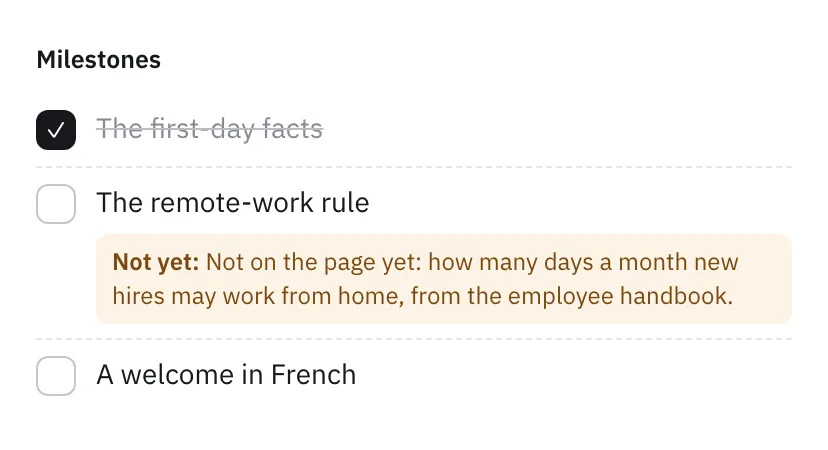 The note says which fact is still missing from the result, without giving the answer.
Some sessions also cap the tokens a learner may spend, so learners learn to get the same result with fewer. Our free token counter shows the idea on any text, and what a token is explains why.
Measure results, not attendance
Completion rates say who showed up. They do not say who can do the task. Track these instead:
What to measure after AI training
Do not stop at
- Courses started
- Hours of video watched
- Quiz score on definitions
Measure instead
- Milestones reached on a real task
- Share using AI weekly on a task
- Time on task, before and after
What managers do to make it stick
A manager can make the training stick with three small habits, none of which needs a budget:
- Book the time. A 45-minute session gets done when the manager blocks it in the team's calendar.
- Name a task. Before the first session, pick one recurring task from the audit that the team will try with AI in the following fortnight.
- Ask for the result. In the weekly meeting, ask what each person got done with AI that week, and collect the answers as examples for the next wave.
How to train employees on AI: a 90-day rollout plan
Ninety days is a workable length for a first wave. A larger company repeats the cycle by wave. Treat each wave as a pilot of the next: whatever the first teams stumbled on becomes a line in the policy and an exercise in the next wave.
Days 1-14: audit and rules. Run the task audit from the first section. Write the one-page policy. Choose two or three pilot teams with a manager who wants it. To run that first wave as a controlled test, follow the eight-week AI pilot plan. Take the baseline.
Days 15-30: one foundation for everyone in the pilot. A few short sessions on what an agent reads and counts, then on how to ask: Tokenacademy's AI Essentials and Prompting with AI programmes cover this. People finish with the same vocabulary, and you see who needs more.
Days 31-60: practice on real tasks. Each role builds something from its own work. A first draft of a procedure, a weekly dashboard, a customer-reply agent tested on real messages. Daily users take several more sessions; champions go on to building, including AI agents of their own.
Days 61-90: measure, fix, scale. Compare the baseline with the milestones reached, weekly use and time on the task; measuring AI training ROI says what to report to finance. Look at where people got stuck: that is the next session to write. Then open the next teams. If the training is built in-house, how to create training with AI gives a five-step workflow.
Two habits make the plan stick. First, sessions on your own cases: Tokenacademy's learning designers can build sessions on a company's own cases with its teams, and your own designers can then write more in the Studio. Second, one visible owner per team, usually the champion, who answers questions after the training ends.
Budget: training and AI usage
Two budgets matter.
The training budget is the cost of running the programme: the content, the time employees spend, the platform. Pricing is discussed on a demo call: book a demo. What you can plan yourself is time: a session is about 45 minutes, so a plan of several sessions per person fits in the 90 days without a day away from the job. If you are still choosing a provider, see nine AI training platforms compared.
The usage budget is the AI itself: the tokens employees spend once trained. It depends on how precisely people ask. To size it, count a sample of your own texts with the free token counter.
FAQ
How long should AI training for employees take?
Plan 90 days for a first wave, not one long course. Sessions of about 45 minutes each, spread over the 90 days, fit into the working week without a day away from the job.
What should an AI training program for employees include?
A foundation for everyone (what an agent reads, counts and costs, checking answers, data rules), a way to write precise requests, practice on each role's real tasks, and a measure of results. Add a build track for the few who will coach others.
Do all employees need the same AI training?
No: see the four groups above.
How do you measure whether AI training worked?
Against a baseline taken before training, on results rather than attendance: see the measures above.
Is AI training for employees required by law?
In the EU, Article 4 of the AI Act obliges providers and deployers to take measures to support the AI literacy of their staff, and it has been enforced since 2 August 2026. Outside the EU there is no equivalent rule that we cover here; check your own regulator.
Sources
- BCG, "AI at Work 2025: momentum builds, but gaps remain": https://www.bcg.com/publications/2025/ai-at-work-momentum-builds-but-gaps-remain
- Regulation (EU) 2024/1689, the AI Act, consolidated text of 27 July 2026: https://eur-lex.europa.eu/legal-content/EN/TXT/HTML/?uri=CELEX:02024R1689-20260727