On this page
The best AI training for employees depends on what you want people to do after the course. Our verdict, checked on 30 October 2026:
- Awareness for many people, at a low price: a catalogue. LinkedIn Learning lists $379.88 per licence a year, Coursera and GoodHabitz publish no list price for their enterprise plans.
- Cloud and technical skills: labs. Microsoft Learn is free; Google Skills and DataCamp run labs too.
- A culture change led by people: Section (coaching, leader workshops) or Multiverse (coached, on-the-job programmes, fundable by the UK Apprenticeship Levy).
- A sandbox where every employee practises with an agent, scored automatically: Tokenacademy (our product).
Nine platforms, four ways of teaching AI
Catalogues: watch, read, quiz
- LinkedIn Learning, Coursera, GoodHabitz
- Widest choice, certificates, many languages
- Self-paced courses
Labs for technical roles
- Microsoft Learn, Google Skills, DataCamp
- Cloud console or browser exercises
- Built for builders and analysts
People-led programmes
- Section, Multiverse
- Coaches, workshops, on-the-job projects
- On quote; UK Levy at Multiverse
Sandbox sessions
- Tokenacademy
- Real agent, sandbox per learner
- Milestones checked automatically
Vendors' own pages, checked 30 Oct 2026. The grouping is ours.
Best AI training for employees: the nine platforms compared
We opened each vendor's own pages on 30 October 2026 and kept only what they say. Where the pages we read say nothing, the figure says "Not on the pages we read": that gap is a question to put in your request for proposal. The format is our classification.
Nine AI training platforms, one card each
LinkedIn Learning
- Format
- Course library
- Hands-on practice
- Not on the pages we read
- Assessment
- Not on the pages we read
- Pricing
- $379.88 per licence a year
Coursera
- Format
- Catalogue
- Hands-on practice
- 1,500+ Guided Projects
- Assessment
- In every course; 150+ certificates
- Pricing
- Team per user; Enterprise on request
Microsoft Learn
- Format
- Labs and modules
- Hands-on practice
- Needs an Azure subscription
- Assessment
- Knowledge checks; exams
- Pricing
- Free
Google Skills
- Format
- Labs
- Hands-on practice
- Labs in Google Cloud
- Assessment
- Badges
- Pricing
- No price shown
DataCamp
- Format
- Courses, live cohorts
- Hands-on practice
- In-browser, AI tutor
- Assessment
- Not on the pages we read
- Pricing
- Demo; no price
GoodHabitz
- Format
- Course library
- Hands-on practice
- Not on the pages we read
- Assessment
- Short assessments
- Pricing
- Custom; 14-day trial
Section
- Format
- Coaching
- Hands-on practice
- Coaching, workshops
- Assessment
- Usage and AI fitness
- Pricing
- Demo; no price
Multiverse
- Format
- Coached programmes
- Hands-on practice
- On-the-job projects
- Assessment
- Expert assessment
- Pricing
- Levy-fundable (UK)
Tokenacademy
- Format
- Sandbox sessions
- Hands-on practice
- Real agent, real project
- Assessment
- Validated automatically
- Pricing
- Demo; no price
Each vendor's own pages, opened 30 Oct 2026. Sources at the end of the article.
What the figure cannot hold:
- Coursera lists 1,500+ hands-on Guided Projects, including secure GenAI Playgrounds, and skill assessments "baked into every course". The Team plan covers up to 499 users; Enterprise (500+) adds single sign-on and an API.
- LinkedIn Learning sells the Teams plan online for 2 to 20 licences, with a one-month trial. Above 20, you contact a specialist.
- Microsoft Learn has exercises that need an Azure subscription, because its sandboxes were retired. Each module ends with a knowledge check.
- GoodHabitz publishes its library in 35+ languages, on its platform or through your LMS, with a 14-day trial. Pricing is custom.
- Section measures AI usage and "AI fitness" in Section HQ, and coaches with Section Coach.
- Multiverse ties projects to business goals, with a coach and 24/7 AI support (Atlas), and tracks ROI.
Which platform fits which need?
Start from the outcome, not the catalogue: what should a person be able to do after the training that they cannot do today? The answer narrows the nine to two or three. Four questions settle it; our guide to video, workshop or hands-on formats goes deeper. If the agent itself is part of the decision, Codex and Claude Code compared for non-developers sets two of them side by side.
Which platform for which need?
- Awareness for everyone?LinkedIn Learning lists $379.88 per licence a year
- Cloud, data, developer skills?Microsoft Learn (free), Google Skills, DataCamp
- Managers and culture change?Section or Multiverse, with coaches
- Practice on real tasks?Tokenacademy: real agent, milestones checked automatically
Plans and offers from each vendor's own pages, checked 30 Oct 2026.
Where does Tokenacademy fit?
When the goal is behaviour, not knowledge. Each employee opens a session and works with a real agent (Claude Code, Codex or GitHub Copilot, as the organization chooses), in a sandbox of their own, on a real project. A session lasts about 45 minutes, with nothing to install and no AI account to create, and milestones are validated automatically on the result. See the AI training sandbox page for the environment, and AI training for employees for what each role learns. If "agent" is new to your team, start with what AI agents are and real uses in companies. We set out the argument for practice over catalogues.
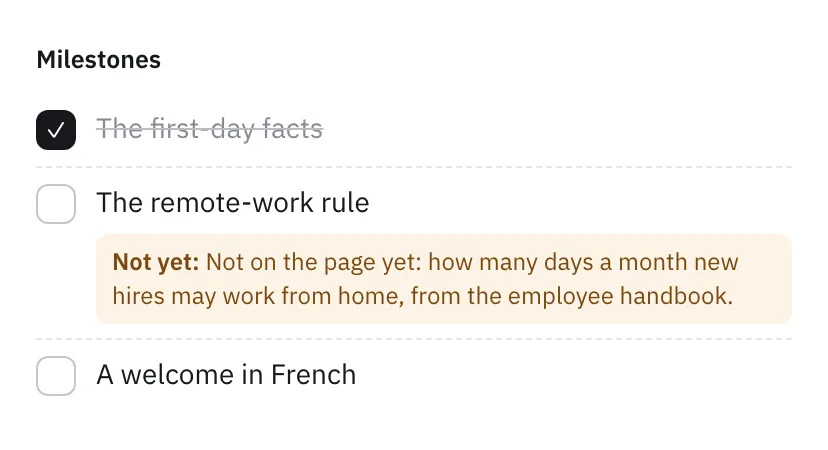 Milestones are checked automatically on the result, and the note says what is missing without giving the answer.
What should you check before you buy?
Use these eight questions with every vendor, including us. To see where your own people stand first, try the AI literacy test. If you would rather build the sessions yourself, see how to create training with AI.
- What do people do in a session: watch, or act?
- Is there a safe place to practise?
- How long is one session, in minutes?
- What is scored: attendance, a quiz or a result?
- Does anyone have to mark it by hand?
- What can you export for your records?
- Where do learners' data and sandboxes run?
- What does it cost per learner, and what is extra?
Tokenacademy's answers:
- Learners act, with a real agent on a real project.
- Yes: each learner has a sandbox of their own, ready with the session's files and data.
- About 45 minutes.
- The result: the page, the files, the agent's replies.
- No: milestones are validated automatically.
- The sessions can be listed in a company's LMS, with each learner's completion and results sent back, and teams kept in step with its HR directory or CRM.
- Tokenacademy's privacy page sets out what the service holds.
- There is no public price, so book a demo. The agents are included, with no AI account or licence to buy per learner.
Question 6 matters in Europe. Article 4 of the AI Act asks providers and deployers to take measures to support the AI literacy of their staff, without guaranteeing a level for any individual (consolidated text; enforced since 2 August 2026, per the Commission's timeline). Our reading is that you need to show the measures you took, not a score for everyone. Our Article 4 guide goes through it.
To see a session on your own use case, book a demo: a 30-minute call. For the background on cost, see what a token is; for the plan around the platform, our guide to training employees on AI; and for the numbers behind the need, AI adoption statistics.
FAQ
What is the best AI training platform for employees?
There is no single best: pick by the outcome you need, as the verdict at the top sets out.
How much does LinkedIn Learning cost for a team?
On its help page LinkedIn lists the Teams plan at $379.88 per licence per year, for 2 to 20 licences online, with a one-month trial.
How much does AI training cost per employee?
It ranges from free (Microsoft Learn) to $379.88 per licence per year (LinkedIn Learning Teams). Coursera Enterprise, GoodHabitz and Section are on request, and Tokenacademy is discussed on a demo call. Compare cost per learner who completes a task, not per licence.
What is a hands-on AI training platform?
One where learners do the work with an AI tool during the training, in a safe environment, instead of watching. Coursera's Guided Projects, Google Skills' labs and Tokenacademy's sandbox sessions are examples, with different depth.
Are free AI courses enough for a company?
For awareness, often yes. For a team that must change how it works, you also need practice, a way to measure it and an owner. Check whether a free course gives the other three.
Sources
All opened on 30 October 2026.
- LinkedIn Learning: Teams self-serve purchase FAQ (price, licence limits, trial).
- Coursera: Compare plans (plans, Guided Projects, assessments, certificates).
- Microsoft: Learn FAQ (cost, credentials, retired sandboxes).
- Google: Google Skills (labs, badges, GEAR credits).
- DataCamp: DataCamp for Business (live cohorts, demo) and its AI-upskilling guide (in-browser course, AI tutor, free to start).
- GoodHabitz: home page (library, languages, assessments, pricing).
- Section: home page (Coach, HQ, services).
- Multiverse: employers page (coaching, Levy, assessment).
- EU AI Act: consolidated text and the Commission's timeline.