On this page
- When you create training with AI: what it does well, and where it needs a person
- Step 1: Start with the goal and the audience
- Step 2: Draft from your own sources
- Step 3: Have an expert check every claim
- Step 4: Try it as a learner before anyone else
- Step 5: Measure what people can do afterwards
- FAQ
- Sources
You can create training with AI in an afternoon: a draft outline, lesson text, quiz questions and a scenario or two. What takes the time is everything after the draft. Someone has to decide what learners must be able to do, check that each claim is true in your company, and find out whether the training works when a real person tries it. Skip those and AI only produces mistakes faster.
This guide is a five-step workflow for L&D and HR teams who make their own training. It says what AI does well, where it needs a person, and how to put the checks between the draft and your learners.
Create training with AI: five steps
- Goal and audienceWhat a learner can do, in one sentence
- Draft from sourcesPolicies and cases in; AI drafts
- Expert checkAn expert checks every claim first
- Try it yourselfOn the screen learners get
- MeasureWhat people can do, not who finished
When you create training with AI: what it does well, and where it needs a person
AI is fast at the first version of almost anything a course is made of. It can suggest a structure, draft lessons, write quiz questions and turn a case into a role-play. The Training Industry article on the opportunities and risks of AI-made training content lists the same uses: ideas for programme structure, quizzes, simulations, role-plays and case studies.
The same article is plain about the other side. Errors, inaccuracies and irrelevant information can creep into AI suggestions, so AI always needs oversight to ensure the quality of the training content. It also warns that giving an AI access to data means it is no longer fully secure, and advises keeping sensitive information out of prompts.
What AI drafts, and what a person decides
AI drafts well
- Outlines, lesson text, quiz questions
- Scenarios and role-plays from cases
- Variants for different roles
- A first version in minutes
A person decides
- What learners must do afterwards
- Each claim true for your company
- What is left out or sensitive
- That it works when tried
Based on the risks named in Training Industry, "Creating Training Content With AI: Opportunities and Risks"
That split gives the workflow its shape. The steps AI helps with are quick. The steps a person owns decide whether the training is any good.
Step 1: Start with the goal and the audience
A vague brief gets a vague course, and AI makes the problem worse because it will happily write forty pages from one loose sentence. Before you open any tool, write the goal as one sentence that names who learns, what they can do afterwards, in what time and where.
A goal an AI can build from
Weak goal
- "Train people on phishing."
- No audience, limit or success test
Strong goal
- Time: after 20 minutes
- Audience: a claims handler
- Behaviour: spot three signs, report it
- Place: our mailbox
"Train people on phishing" cannot be built from, tested or measured. "After 20 minutes, a claims handler can spot the three signs of a phishing email in our mailbox and report it" can. The second version also tells you what to leave out: everything that does not help a claims handler do that one thing.
Write down three more things at this point: who the learners are (their role and what they already know), the one thing that must not go wrong (the risk the training exists to reduce), and how you will know it worked. You will need the last one in step five, and it is much easier to write before you have a course to defend.
Step 2: Draft from your own sources
A general chat assistant knows how phishing works in general. It does not know your mailbox, your reporting button or your policy. Training built from its general knowledge reads fine and teaches the wrong procedure.
So give the draft your material: the policy document, the procedure, three real cases with the names removed, the questions people actually ask the help desk. Ask for a structure first and read it before any lesson text is written; it is far cheaper to fix an outline than forty lessons.
Two habits make the draft better:
- Ask for scenarios from your cases, not invented ones. A scenario built on a real, anonymised case is recognised at once by learners and checked quickly by an expert.
- Ask for the assumptions. Have the AI list what it assumed about your company. Every wrong assumption is a claim to fix in step three.
Anything you paste into a tool must be something you may share with it. If the tool is not approved for your internal documents, use made-up or anonymised versions of them.
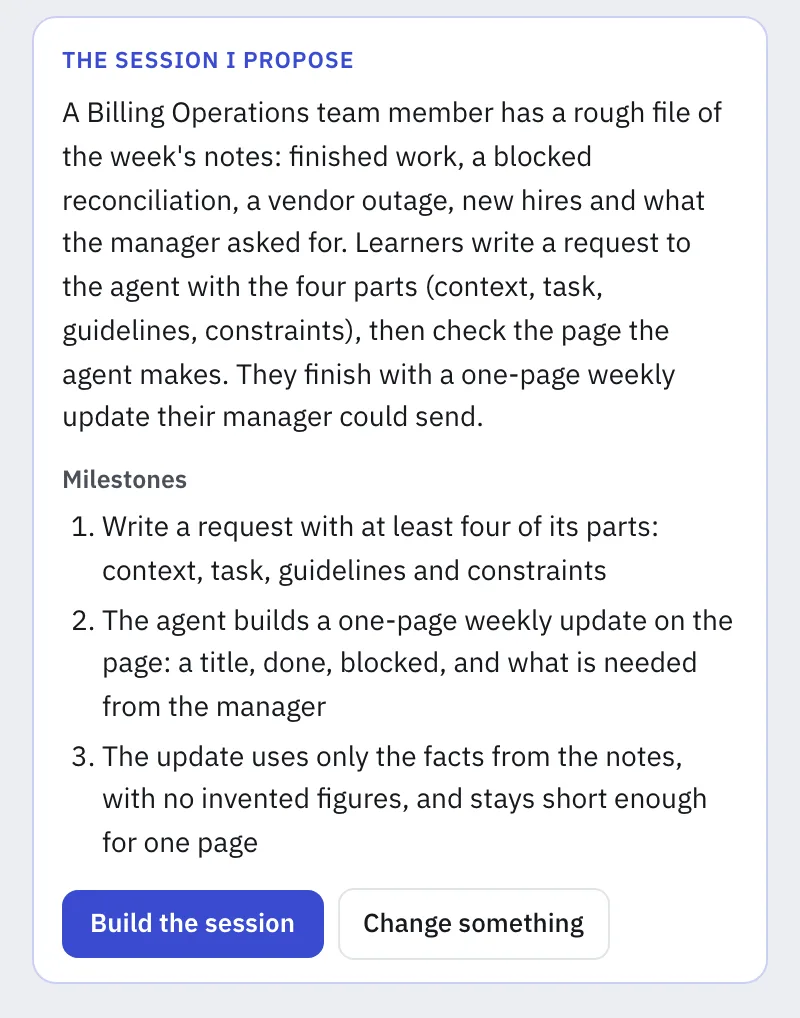 The designer describes what learners should do; the assistant proposes a story and three milestones.
Step 3: Have an expert check every claim
AI is confident whether it is right or wrong. The person who knows the procedure, the subject expert, is the one to check it, and they need a task they can finish: not "have a look" but four questions to answer for each page.
The expert check: four questions per page
- Is it true here?Right for your company, tools, rules
- Is it sourced?Figures trace to a document you can open
- Is it safe?No personal data, confidential detail or bias
- Is it missing something?What a colleague would add on day one
In short: true here means right for your company's tools and rules, sourced means traceable to a document you can open, safe means no personal or confidential detail, and missing means what an experienced colleague would tell a newcomer.
Give the expert the draft and the sources side by side, so that they check against the source and not from memory. If a regulation is involved, link it from the official text and let your legal team read that page.
Step 4: Try it as a learner before anyone else
This is the step that is easiest to skip, and it is where the mistakes a reviewer cannot see appear: the instruction that is ambiguous, the quiz question with two right answers, the exercise that takes forty minutes instead of twenty.
Do the training yourself, on the same screen learners will use, with a timer. Note every place where you hesitate. Then ask someone from the target group to do it while you watch and say nothing. Keep a short list of what they stumbled on, sort it into three kinds (unclear instruction, wrong content, too long) and fix the first kind before the others, because an unclear instruction makes every later result look worse than it is. Then run it again with a second person: if the same spot trips them both, the problem is in the training, not in the learner. Once it holds up with two people, scale the trial to a group with a small-cohort pilot.
Step 4: the trial, in five moves
- Do it yourselfLearners' screen, timer; note hesitations
- Watch one learnerSomeone from the target group; say nothing
- Sort what went wrongUnclear instruction, wrong content, too long
- Fix the unclear firstIt makes later results look worse
- Try a second personSame spot trips both: training at fault
With the Studio, Tokenacademy's AI e-learning authoring tool, a learning designer describes a session, with its files and business case, and the Studio's agent drafts the mission, steps and milestones. The designer tries it as a learner before anything is published; publishing stays the designer's decision.
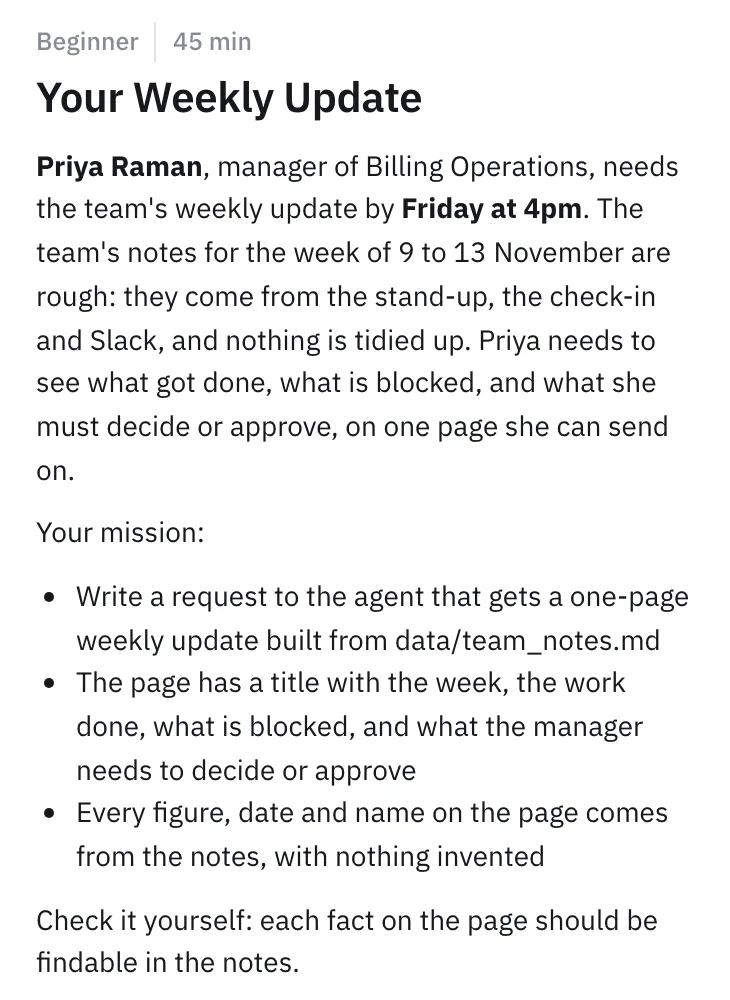 The brief learners will read: a scenario, a mission and a check they can do themselves.
For skills that are practical, such as writing a request to an AI agent, the trial matters even more, because watching a demonstration does not teach the skill. Our comparison of AI training formats says when video, a workshop or hands-on practice fits, and hands-on AI training explains why practice beats slides.
Step 5: Measure what people can do afterwards
Completion rates tell you who clicked to the end. They do not tell you who can now do the task. Go back to the sentence you wrote in step one and ask whether you can see it happen. Indicators that show real skill rather than attendance are covered in the guide to AI training ROI.
- A task, not a quiz. Give learners a small real task and check the result: did the claims handler report the phishing email correctly?
- Compare before and after. Run the same task at the start and a few weeks later. The difference is the training's effect.
- Read the mistakes. The wrong answers that repeat show what the training did not explain, and they feed the next version.
- Update one piece at a time. When a policy changes, change that lesson, not the whole course.
For how this fits a company-wide programme, see how to train employees on AI and our overview of AI training for employees.
To see the Studio working on a session of your own, book a demo.
FAQ
How do you create training with AI?
Write the goal as one sentence, draft from your own documents and cases, have a subject expert check every claim, try the training yourself as a learner, then measure what people can do. The drafting is the quick part; the checks are what make it trustworthy.
Can AI create a whole training course?
It can draft one, including structure, lessons, quizzes and scenarios. It cannot know what is true in your company or whether the course works for your people, so a person has to set the goal, check the content and test it with learners before publication.
What are the risks of using AI to create training content?
Errors that look confident, bias taken from the data a model learned from, and the exposure of sensitive information put into prompts. Training Industry names accuracy and data security among the risks and recommends human oversight, secure tools and keeping sensitive information out of prompts.
Should a subject matter expert review AI-made training?
Yes, every time: AI is confident whether it is right or wrong, and only the expert knows what is true in your company.
How long does it take to create training with AI?
The first draft takes minutes to hours. The expert review, the trial as a learner and the measurement take longer than the drafting, and they are where most of the quality comes from. Plan for them rather than for the draft alone.
Sources
- Training Industry, "Creating training content with AI: opportunities and risks": https://trainingindustry.com/articles/content-development/creating-training-content-with-ai-opportunities-and-risks/